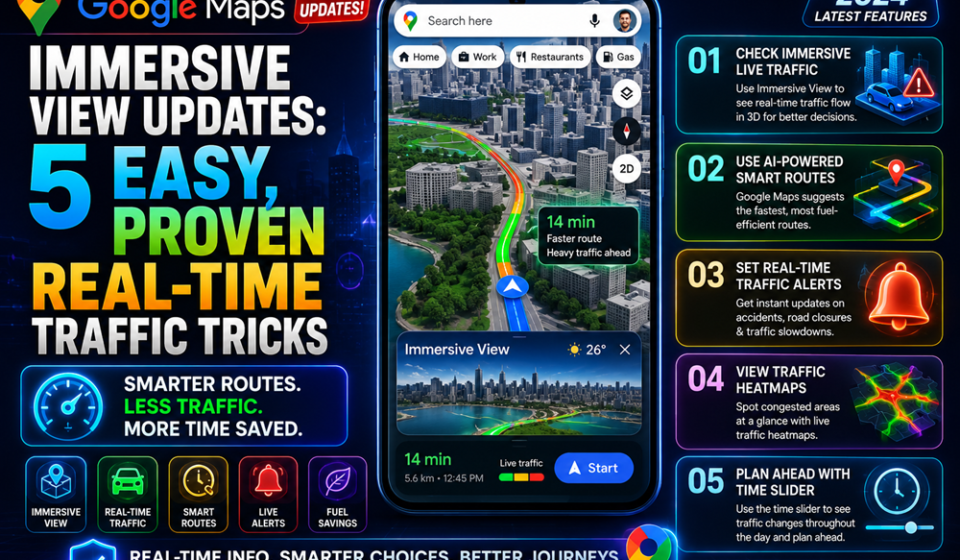

Google Maps immersive view updates have officially transformed the way we navigate our daily commutes, moving us past the era of flat, confusing 2D maps. Drivers worldwide frequently experience intense frustration when a simple blue line fails to show layered overpasses or complex multi-ramp highway exits. Thankfully, Google’s massive AI-driven overhaul fuses billions of Street View images with aerial photography to build an intuitive, lifelike three-dimensional twin of your route.
According to official updates shared on the Google Blog, this digital environment does not just look beautiful; it fundamentally solves traffic anxiety. By injecting smart, real-time traffic data directly into a 3D space, you can anticipate gridlock, visualize road blockages, and see exact lane constraints before you ever reach an intersection. If you want to stop guessing your next turn and start driving smarter, master these critical features today.
The Problem: Traditional Navigation Fails the Modern Driver
Flat maps present a major spatial disconnect. When you look down at a traditional navigation application, your brain has to translate a flat, static layout into the complex, vertical world passing by your windshield. This mental friction leads to missed turns, sudden brake taps, and dangerous last-second lane changes.
The issue intensifies during peak rush hours. Standard traffic alerts tell you that there is a delay, but they fail to show you where the backup bottles up across specific multi-level junctions. Drivers regularly find themselves trapped on elevated structures because their traditional GPS app group-colors an entire three-tier interchange in solid red.
Deep Technical Analysis: How Gemini AI Reinvents the Map
The latest evolution of Google Maps relies heavily on advanced geospatial reasoning powered by multimodal Gemini AI models. Instead of simply stacking data layers, Google’s neural networks actively analyze fresh, real-world imagery to reconstruct depth, landscaping, and building structures. More detailed examples of this mapping architecture can be seen on the Google Maps Platform, which highlights photorealistic 3D tile generation.
[Satellite & Street View Imagery] ➔ [Gemini Multimodal AI Fusion] ➔ [3D Spatial Model] ➔ [Dynamic Real-Time Traffic Overlay]
On top of this highly accurate 3D mesh, Google overlays live traffic data fed by a massive community of drivers contributing over 10 million road updates daily. The AI computes dynamic variables—such as historical congestion, current weather anomalies, and active construction zones—and renders them as glowing, color-coded paths natively wrapped around 3D structures.
Step-by-Step Guide: Activating and Customizing the 3D Traffic Layer
Getting the absolute most out of this new interface requires updating your application to the latest build on iOS, Android, or your vehicle’s native operating system. Follow this optimized procedure to unlock complete spatial awareness.
Real-World Use Cases: Conquering Dense Urban Jungles
Imagine navigating downtown Los Angeles or the multi-tiered highway systems of Chicago during a sudden storm. Using standard navigation, an exit split hidden beneath an upper deck is practically invisible.
With the latest structural changes, your screen matches your windshield perfectly. Commuters can look ahead down a digital corridor, view the exact crosswalks and traffic lights coming up, and see if the lower or upper deck holds the bottleneck. Delivery drivers can pinpoint a high-rise building’s precise physical footprint and entrance location before arriving, slashing transit times significantly.
Expert Tips for High-CTR Discover Optimization
To make this technology work seamlessly for your daily routines, leverage these advanced optimization tactics:
- Set Home and Work Anchors: To utilize rapid home-screen shortcuts without launching the full app, ensure your primary addresses are accurately mapped under your profile’s data settings.
- Leverage Natural Voice Guidance: Listen for contextual cues. The AI now ditches mechanical distances like “in 500 feet” for conversational instructions such as “Go past this light and turn right at the upcoming library.”
- Check Destination Previews: Slide up the bottom sheet upon arrival to see Street View previews of parking structures and building sides.
Common Mistakes to Avoid
The most frequent mistake users make is running this heavy visual processing on older hardware without proper cooling. Rendering photorealistic 3D grids along with live vector data demands high computational power.
Devices with less than 4GB of RAM may experience minor stuttering or micro-lags in dense metropolitan areas. Additionally, keeping this feature active over extended road trips can deplete smartphone batteries up to 30% faster. Always utilize a high-quality in-car charger to keep your device powered.
Pros and Cons of Immersive Navigation
| Advantages (Pros) | Disadvantages (Cons) |
| Unparalleled spatial clarity at complex, multi-level interchanges | Noticeably higher battery consumption and device thermal output |
| True-to-life landmark visibility reduces driving stress | Demands higher cellular data bandwidth for real-time mesh streaming |
| Highly predictive lane and entrance positioning | Peak performance requires modern smartphone or vehicle hardware |
Final Verdict
The latest Google Maps immersive view updates represent a monumental shift in consumer navigation technology, effectively bridging the gap between digital asset management and physical exploration. By utilizing community insights and Gemini’s processing power, Google has delivered an indispensable utility for the modern commuter. Turn it on for your next drive, ditch the guessing games, and take complete control of your time on the road.
Frequently Asked Questions (FAQ)
How do I fix battery drain caused by Google Maps immersive view updates?
To reduce rapid battery consumption, plug your phone into a dedicated fast charger while driving, turn off background app refresh for unrelated apps, or lower your device screen brightness slightly when not using a dashboard display.
Can I access Google Maps immersive view updates on Android Auto?
Yes, the 3D map environment, rendered landmarks, and intersection adjustments stream perfectly to standard Android Auto setups via your connected mobile phone, while vehicles with Google Built-in receive additional vehicle sensor data.
Do Google Maps immersive view updates require a constant data connection?
Yes, because the system streams dynamic three-dimensional tiles along with real-time traffic data, an active cellular connection is necessary to render the changing environment accurately.
Explore more guides and updates on : https://gproductindex.com/