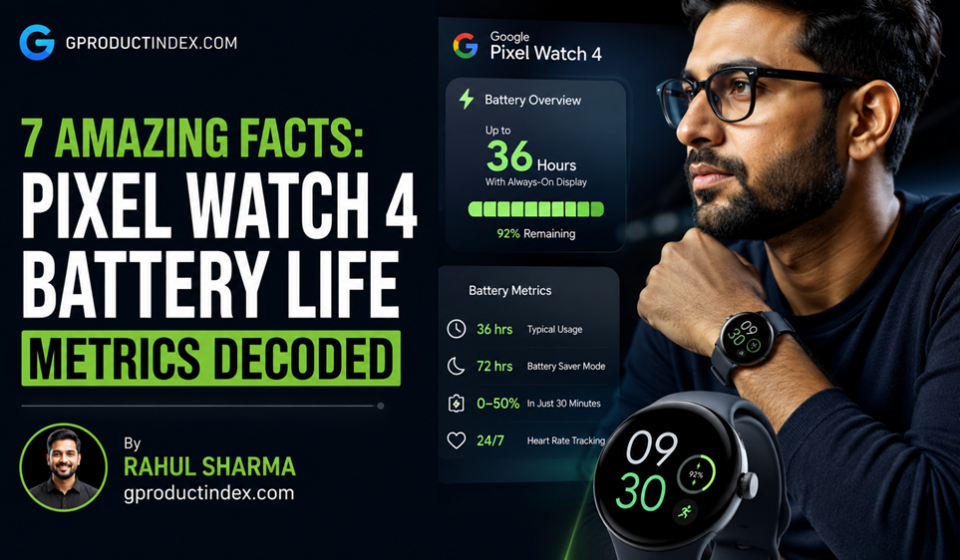

The Pixel Watch 4 battery life metrics reveal a massive generational leap for Google’s wearable line, delivering up to 30 hours of continuous runtime on the 41mm model and up to 40 hours on the 45mm model with the Always-On Display (AOD) active. When compared to older Apple smartwatches like the Apple Watch Series 6 or Series 7, which operate on a standard 18-hour battery architecture, the Pixel Watch 4 battery life metrics highlight a clear structural advantage. Backed by a 4nm processor and Wear OS 6 optimization, Google’s wearable easily extends to 48–72 hours in dedicated Battery Saver mode, fundamentally rewriting the daily charging routine for modern Android users.
Introduction
For years, the biggest compromise in the premium smartwatch space wasn’t the depth of health tracking or the snappiness of the interface; it was raw endurance. Early generations of the Google Pixel Watch lineup left tracking enthusiasts frustrated, as they frequently required daily charging intervals just to get through a basic mix of standard daytime alerts and overnight sleep metrics.
The launch of the latest Google ecosystem changes this dynamic completely. By overhauling internal power management, the Pixel Watch 4 battery life metrics prove that high-performance tracking no longer requires sacrificing longevity.
This detailed breakdown analyzes how the Pixel Watch 4 battery life metrics stack up against older Apple smartwatches. By examining processor efficiency, cellular power usage, display hardware changes, and charging curves, we reveal how Google’s hardware refines power consumption to outperform legacy iOS alternatives.
Pixel Watch 4 Battery Performance Architecture
Evaluating the Pixel Watch 4 battery life metrics requires a close look at the underlying hardware configuration. Google moved past the fragile power-delivery systems of its earlier releases by pairing a physically larger battery cell with a highly optimized silicon architecture. The 41mm variant carries a 325 mAh lithium-ion cell, while the larger 45mm model shifts up to a 455 mAh capacity, setting a solid foundation for extended runtime metrics.
The true secret weapon behind the Pixel Watch 4 battery life metrics, however, is the implementation of the Qualcomm Snapdragon W5 Gen 2 platform.
Advanced Co-Processor System Distribution
Rather than waking up the main application cores for every minor wrist movement or heart rate scan, the watch uses a dedicated machine-learning coprocessor. The primary Cortex-A53 cores sleep during passive standby windows, handing over background health sensing, step counting, and timekeeping tasks to the ultra-low-power auxiliary chip. This hardware setup dramatically reduces static battery drain, allowing the watch to save precious capacity during long workdays.
Adaptive Display Power Management
The upgraded domed Actua display delivers an impressive peak brightness of 3000 nits for outdoor readability. However, to keep the Pixel Watch 4 battery life metrics from plummeting under bright sunlight, the underlying LTPO AMOLED backplane drops its refresh rate down to 1 Hz when static. This display adjustment significantly reduces active power consumption during idle moments, preserving cell performance without forcing the user to disable the convenient Always-On Display.
Step-by-Step Guide to Maximizing Wearable Battery Lifespans
While the factory configurations yield exceptional longevity, custom environment adjustments can stretch your hardware parameters even further. Use these sequential system configurations inside the Wear OS platform to optimize your daily power management.
1. Configure Adaptive Display Parameters
To ensure that high-nit screen profiles do not drain your power reserves prematurely, verify that your screen timeout and adaptive scaling settings are properly configured.
- Swipe down from the main watch face to reveal the quick settings tile matrix.
- Tap the Settings gear icon and scroll down to select the Display options.
- Turn on the toggle for Adaptive Brightness to let the built-in sensor manage output matching.
- Open the Screen Timeout sub-menu and adjust the duration down to a brief 10-second window.
2. Enable Intelligent Bedtime Tracking
Prevent incoming notifications, display activations, and haptic alerts from consuming power while you sleep by configuring automated bedtime scripts.
- Navigate back to the core Settings directory and select the Features tab.
- Tap into the Bedtime Mode custom configurations profile.
- Select the Auto Enter / Auto Exit scheduling wizard.
- Map the active runtime windows to your actual sleep schedule to drop the watch into a low-power state overnight.
3. Optimize Location Services and GPS Accuracy
Running location sweeps can quickly drain a small wearable battery. Configure internal location services to use energy-efficient network assets instead of relying solely on raw satellite hardware.
- Open the system Settings menu and scroll down to the Location tab.
- Tap the Google Location Accuracy configuration row.
- Turn on the toggle for Improve Location Accuracy to allow the system to use local Wi-Fi and cell tower triangulation, reducing heavy standalone GPS battery drain.
4. Activate Multi-Day Battery Saver Mode
When navigating remote travel paths without access to a quick charge dock, drop the system into its deepest power-saving state to keep vital safety features running.
- Swipe down on the primary interface and tap the Battery percentage indicator icon.
- Scroll past the current remaining estimates and select Battery Saver Mode.
- Confirm the prompt by tapping OK to instantly disable the AOD and suspend non-essential background app syncs.
Common Wearable Power Management Pitfalls to Avoid
Achieving the peak numbers highlighted in the Pixel Watch 4 battery life metrics requires avoiding a few common user configuration and charging mistakes.
Running Independent LTE Streaming for Extended Windows
Relying entirely on cellular LTE data to stream high-bitrate music directly to Bluetooth earbuds during outdoor runs uses an immense amount of power. Real-world testing shows that continuous LTE streaming combined with dual-band GPS usage can exhaust a full charge in roughly 3.5 hours. To preserve your runtime metrics, download your workout playlists directly to the watch’s internal 32 GB storage before heading out.
Using Static, High-Contrast Third-Party Watch Faces
Installing unoptimized third-party watch faces from the Google Play Store that feature full-screen white backgrounds or complex custom animations can bypass the system’s 1 Hz refresh rate optimizations. These custom configurations keep the high-power processing cores active, which can lead to unexpected midday battery drain. Stick to optimized watch faces that use dark backgrounds to save power.
Leaving the Wearable on the Charging Dock for Days
Leaving your smartwatch connected to a live charging dock for extended periods can accelerate battery aging due to heat buildup. To prevent long-term degradation, make sure the built-in protection features are working. The platform addresses this with an integrated system feature that stops charging at 80% if the device is plugged in for over 4 days, preserving the chemical lifespan of the lithium-ion cell.
Benchmark Metrics: Pixel Watch 4 vs Older Apple Watches
The data table below outlines the real-world performance differences between the Pixel Watch 4 battery life metrics and older Apple smartwatch architectures during typical daily use cases.
| Battery Metric Performance | Pixel Watch 4 (45mm) | Pixel Watch 4 (41mm) | Apple Watch Series 7 | Apple Watch Series 6 |
| Official Rated Battery Life | Up to 40 Hours (AOD On) | Up to 30 Hours (AOD On) | Up to 18 Hours (AOD Off) | Up to 18 Hours (AOD Off) |
| Standby Power Drain (Per Hour) | ~1.2% to 1.4% | ~1.8% to 2.1% | ~2.5% to 3.0% | ~3.2% to 3.8% |
| Overnight Sleep Tracking Cost | ~7% to 10% (8 Hours) | ~11% to 14% (8 Hours) | ~15% to 20% (8 Hours) | ~18% to 25% (8 Hours) |
| Standalone GPS Tracking Drain | 8% to 12% Per Hour | 12% to 16% Per Hour | 20% to 25% Per Hour | 22% to 28% Per Hour |
| Max Battery Saver Duration | Up to 72 Hours Total | Up to 48 Hours Total | Up to 36 Hours (Low Power) | Not Supported Natively |
| Quick Charge Speed (To 50%) | ~15 Minutes | ~15 Minutes | ~45 Minutes | ~60 Minutes |
Pros and Cons of the Pixel Watch 4 Power Architecture
Pros
- Multi-Day Standby Longevity: The 45mm model easily delivers a reliable two-day runtime during normal use, matching the performance of dedicated sports watches.
- Rapid Charging Recovery: The side-mounted charging dock delivers a 50% charge in just 15 minutes, making morning top-ups quick and convenient.
- Efficient Background Tracking: The dedicated coprocessor handles heart rate and activity metrics with minimal impact on overall power drain.
- Smart Software Saving: Wear OS 6 features a deep battery saver mode that extends the watch’s operational lifespan up to 72 hours without losing core fitness data.
Cons
- Heavy Cellular Power Consumption: Continuous LTE data usage coupled with dual-band GPS remains a demanding task that shortens active tracking windows.
- New Charger Incompatibility: The updated charging design means older generation cords will not work with this latest model.
Frequently Asked Questions
What are the official Pixel Watch 4 battery life metrics?
The official specifications rate the 45mm variant for up to 40 hours of runtime with the Always-On Display enabled, while the 41mm model is rated for up to 30 hours of continuous use.
How do Pixel Watch 4 battery life metrics compare to older Apple smartwatches?
Older iOS wearables like the Series 6 and Series 7 are limited by a legacy 18-hour design footprint. The Pixel Watch 4 nearly doubles that endurance, offering a true multi-day experience.
How much battery capacity does overnight sleep tracking use?
Real-world user testing shows the 45mm model uses a minimal 7% to 10% of its battery over an 8-hour sleep tracking session, leaving plenty of power for the following day.
Does keeping the Always-On Display active drain the battery fast?
The impact is significantly reduced thanks to the LTPO display backplane, which automatically drops the screen’s refresh rate down to 1 Hz when static to save energy.
What is the charging speed of the updated charging dock?
The updated side-mounted charging dock can charge either size variant from 0% to 50% in approximately 15 minutes, while a full charge takes 45 to 60 minutes.
Can I run a full marathon with GPS active on a single charge?
Yes. With an active standalone GPS battery drain of only 8% to 12% per hour, a fully charged watch can continuously track outdoor workouts for 8 to 10 hours straight.
What happens to background metrics when Battery Saver is turned on?
Battery Saver turns off the Always-On Display and limits background data syncing, but it keeps key health, safety, and step-tracking features completely active.
Why did Google update the charging connection on this latest model?
The shift to a side-mounted dock allows for faster power delivery and better heat management, though it means chargers from older models are not compatible.
Does using Gemini voice assistance drain the battery rapidly?
Frequent voice commands and AI responses will increase active power consumption, but normal daily interactions have a minimal impact on overall battery life.
How does the watch protect long-term battery health?
The system features an integrated Battery Defender tool that pauses charging at 80% if the device remains plugged in for more than four days, helping prevent early cell degradation.
Final Verdict
The Pixel Watch 4 battery life metrics signal a major turning point for Android’s premier wearable ecosystem. By moving past the old limitation of daily charging and delivering a true multi-day battery lifespan, Google has created a powerful alternative to legacy smartwatches. When compared to the 18-hour limits of older Apple smartwatches, the efficiency of the Snapdragon W5 Gen 2 platform and the optimizations of Wear OS 6 give Google users a clear advantage.
For any Android user looking for a premium wearable that tracks health metrics around the clock without constant low-battery anxiety, the choice is clear.
Technical Resources and References
Internal Links
For a deeper dive into our architectural components, view our related breakdowns:
External References
Review official documentation and industry releases directly from primary authorities:
- Google Store Specifications: https://store.google.com/product/pixel_watch_4
- Google Support Deployment Portal: https://support.google.com/googlepixelwatch/answer/12742648
- Qualcomm Wearable Architecture Notes: https://www.qualcomm.com/products/application/wearables