
The era of passive chat interfaces has officially evolved. Revealed at Google I/O 2026, the Gemini Spark AI agent marks a monumental shift from standard conversational assistants to persistent, background digital workers. Instead of waiting for you to type a prompt, keeping a browser window pinned open, or killing its process the moment you lock your mobile screen, this cloud-native system executes complex multi-step jobs around the clock.
Because the runtime is deployed natively onto private virtual machines within Google Cloud infrastructure, it preserves your context, checks for data updates, and processes systemic actions while your devices are completely dark.
If you are a tech professional or developer ready to deploy background workers that write your drafts, audit financial streams, or integrate via Model Context Protocol (MCP) with external platforms, this guide will walk you through how to configure the Gemini Spark AI agent for maximum automated efficiency.
The Problem: The Session Lifecycle Bottleneck
Traditional LLM workflows suffer from a terminal bottleneck: they are strictly session-based. When you interact with a standard chat prompt, the execution lifecycle begins and ends within that single HTTP request-response loop. If you want an AI to monitor a data pipeline, aggregate daily communication logs, or cross-reference recurring spreadsheet transactions, you must manually initiate the session every single time.
This fragmentation creates massive manual overhead. For developers, systems administrators, and power users, building custom cron jobs or heavy python webhooks to keep an AI pipeline humming is incredibly brittle. If a token window limits context mid-stream, or your local runtime loses internet connectivity, the automation collapses.
The Gemini Spark AI agent directly solves this execution gap by combining continuous state persistence with ultra-low latency.
Deep Dive: The Core Architecture Underlying Spark
To successfully configure the system, you must understand the underlying technical layer that keeps your automation running safely without human intervention. The runtime uses a distinct three-tier architecture:
| Architectural Layer | Technical Engine | Primary Functional Task |
| 1. The Reasoning Brain | Gemini 3.5 Flash | Drives high-speed logic, code synthesis, and contextual intent mapping at over 280 tokens per second. |
| 2. The Constraint Harness | Google Antigravity 2.0 | Enforces strict safety profiles, decomposes high-level goals, and maintains execution state loops. |
| 3. The Infrastructure Layer | Dedicated Cloud VMs | Provides 24/7 processing persistence independent of user device connection or local hardware status. |
By utilizing Gemini 3.5 Flash as its execution core, the system processes massive data environments effortlessly. This allows the agent to handle long-horizon planning patterns while relying on the Antigravity harness to prevent the system from executing unauthorized actions or drifting from its core instruction set.
Step-by-Step: How to Configure the Gemini Spark AI Agent
Follow this procedural sequence to initialize your first autonomous 24/7 background automation pipeline safely.
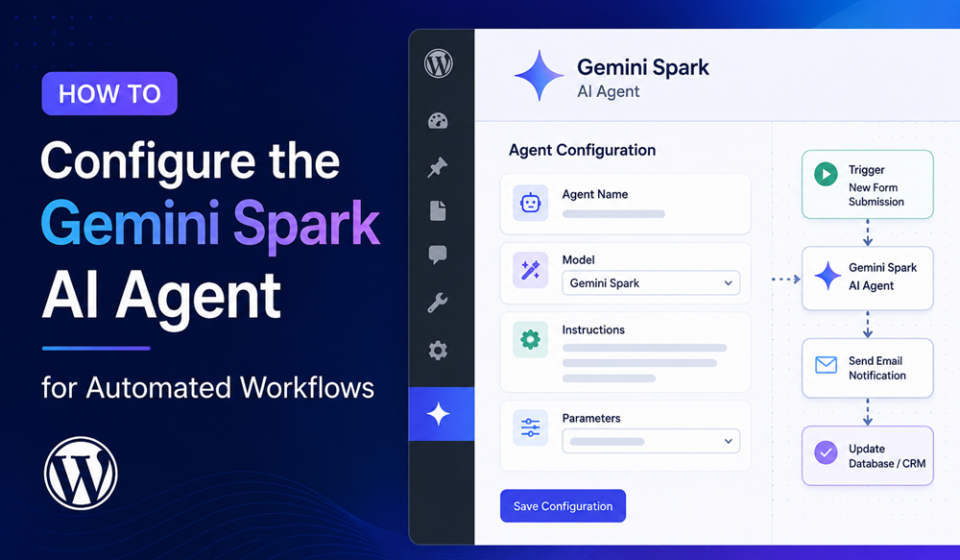
1.Verify Account Provisioning and Workspace Access:Prerequisite Verification.
Log into your platform console and confirm your active subscription to the Google AI Ultra plan. Navigate to your security center and grant the core system operational read/write permissions for target applications including Gmail, Google Docs, and Google Sheets.
2.Establish the Trigger Event Rules:Step 2.
Define how your background worker initiates its process. In the Spark configuration panel, select your trigger type: Time-Based (e.g., executing every Friday at 5:00 PM), Data-Inbound Webhook, or an Email Inbound Event that parses incoming messages based on specific filter criteria.
3.Map the Data Input and Output Contracts:Step 3.
Define the precise structural layout for the data passing through the system. For instance, construct a contract specifying that the input is a raw credit card statement CSV document, while the output must produce a cleanly formatted JSON summary sorting identified recurring platform subscription fees.
4.Inject Custom Teachable Skills via System Prompts:Step 4.
Upload a specialized behavioral profile to your agent. To establish a specific tone or structured formatting rule, feed the system a baseline sample repository (such as your past 30 technical summary document formats) so it can build a persistent, localized writing skill matrix.
5.Configure External Third-Party MCP Connectors:Step 5.
To extend functionality beyond the default Workspace silo, bind third-party tools like Canva, Instacart, or OpenTable using Model Context Protocol (MCP) authentication tokens. This safely allows your agent to cross-reference data and configure workflows inside external software ecosystems.
6.Enforce Safety Policies and Expense Protocols:Step 6.
Activate the Agent Payments Protocol (AP2) configuration. Set hard budget limits for automated financial executions, restrict merchant processing IDs, and specify that high-stakes actions like sending public client-facing emails require manual validation.
Expert Optimization Tips for Ambient Productivity
Configuring the system is only half the battle; optimizing it for zero-latency execution requires a few advanced structural adjustments:
- Isolate Your Sensing and Acting Layers: Design your instructions so the agent completely classifies, reviews, and filters data streams before attempting downstream modifications.
- Keep Prompts Highly Programmatic: Treat system instructions like structured data. Use strict bulleted requirements, state conditions using clear “IF/THEN” constraints, and define output expectations as strict schemas to minimize processing variances.
- Leverage the 1-Million Token Window: Don’t hesitate to upload comprehensive documentation sheets or massive reference guidelines directly into the agent’s memory base; it is explicitly optimized to hold deep structural context without performance degradation.
Common Mistakes to Avoid
- Setting Excessive Polling Frequencies: Configuring your background trigger to scrape data every single minute when target metrics only update once a day wastes substantial compute resources and leads to unnecessary token saturation.
- Omitting the Human Review Fallback Queue: Deploying an autonomous workflow without setting a clear uncertainty buffer causes systemic execution errors. Always configure low-confidence outputs to automatically dump into a review queue.
- Over-scoping Initial Deployment Tasks: Attempting to build an absolute end-to-end multi-app workflow on day one typically leads to configuration bugs. Build, test, and authenticate individual application stages incrementally.
Pros and Cons of Cloud-Persistent AI Automation
Pros
- Absolute Device Independence: Workflows continue executing flawlessly when your laptop is turned off or your mobile network completely drops.
- Blazing Structural Execution Speed: Powered by Gemini 3.5 Flash, long-horizon data compilation steps take mere seconds.
- Deep Architectural Safety Ecosystem: Built-in protocol rails protect sensitive accounting networks, preventing runaway API calls or unexpected credit usage.
Cons
- Premium Subscription Barrier: Enterprise usage requires a commitment to premium tier licensing options starting near $100–$200 monthly per seat.
- Early Geographic Beta Restrictions: Advanced ecosystem functions and specific third-party integration pipelines remain limited to early localized beta territories.
Real-World Enterprise Use Cases
- Automated Client Invoicing Operations: The agent detects logged labor hours within an administrative tracker sheet, auto-generates a polished invoice draft in Google Docs, and queues the finalized message inside Gmail on a specific calendar schedule.
- SaaS Subscription Charge Auditing: The system continuously monitors monthly corporate banking documentation pools to proactively flag hidden billing spikes, service plan shifts, or ghost accounts.
- Cross-Platform Event Coordination: It easily aggregates raw notes scattered across project channels, forms central tracking sheets with operational deadlines, and sends invites out across corporate calendar spaces.
Summary Summary & Next Steps
Learning how to properly configure the Gemini Spark AI agent marks your entry into true ambient operational productivity. By setting precise triggers, mapping tight input/output contracts, and deploying hard boundaries through the Agent Payments Protocol, you turn an everyday assistant into an autonomous 24/7 worker asset. Start by rolling out low-stakes, internal workflow tests to refine your system prompts before scaling automation control to broader company-wide tools.
Explore More Google Products & Tools
To see how these new high-speed models fit into Google’s broader software roadmap, check out our comprehensive Google Product Index Categories Hub on the homepage to browse through active enterprise toolsets.
Google Product Index Categories Hub:
https://www.google.com/search?q=https://gproductindex.com/
To track how these new tools fit into the wider landscape of active and legacy applications, you can explore our comprehensive Google Products Database Hub right on our homepage.
Google Products Database Hub:
10. FAQ Schema
What is the primary advantage of utilizing the Gemini Spark AI agent?
Unlike typical on-demand conversational chatbots, this system lives persistently on remote cloud infrastructure, executing automated multi-step workflows even when your devices are shut down or completely offline.
How does the system ensure safety during autonomous financial actions?
The architecture relies directly on the Agent Payments Protocol (AP2) framework, enabling users to enforce hard monetary caps, whitelist specific vendors, and require explicit manual authorization keys before executing high-stakes external transactions.
Can I build custom business behavior parameters into the agent?
Yes. You can configure persistent “Teachable Skills” by introducing standard training documentation and template patterns into its memory matrix, establishing permanent procedural guidelines for text processing or document composition.
11. Internal Link Suggestions
- https://gproductindex.com/ai-updates-gemini-3-5-flash-features/
12. Social Media Caption
Stop managing your AI prompts manually. 🛠️ Learn how to configure the new always-on Gemini Spark AI agent to handle complex business workflows, parse heavy data streams, and coordinate applications 24/7—even with your laptop completely shut down! Read our full setup blueprint here: [Link] #AIOps #Productivity #GoogleGemini #Automation
13. Pinterest Description
Master the art of ambient business automation! This step-by-step configuration manual shows you how to program the brand-new Gemini Spark AI agent to run secure background workflows across Workspace and third-party tools 24/7. Save hours of weekly manual operations today.
14. YouTube Description
Google’s brand new Gemini Spark AI agent changes everything we know about digital automation. In this detailed guide, we break down exactly how to configure this cloud-persistent worker runtime to manage your emails, track business datasets, and connect external MCP software programs while you sleep. Don’t forget to like, subscribe, and check out our full text-based guide for systemic code setups!