
The landscape of AI-assisted engineering just shifted underneath our feet. Launched at the annual keynote, the official rollout of the Google Antigravity 2.0 framework represents a complete platform pivot. Rather than delivering a simple IDE refresh or a predictable autocomplete plugin, Google has introduced a standalone, agent-first development environment built entirely around autonomous orchestration.
Whether you are managing complex, multi-file software engineering pipelines or building autonomous backend microservices, mastering the new system demands a total rethink of your production stack.
Our comprehensive technical deep dive explores the core mechanics of the Google Antigravity 2.0 framework, unpacking how its unique runtime parameters completely replace traditional development paradigms.
The Problem: The Cognitive Limits of Basic Autocomplete Extensions
Traditional coding assistants are hitting a terminal wall. Legacy extensions operate as simple, text-based autocomplete models locked tightly inside standard editor tabs. When an engineer needs to execute long-horizon architectural tasks—such as updating an entire repository configuration or building complex data routing services—they must manually prompt the model file-by-file, copy over code snippets, and trace dependencies by hand.
This manual fragmentation slows down development and burns an excessive amount of contextual processing token space.
The introduction of the standalone Google Antigravity 2.0 framework solves this structural bottleneck. Instead of forcing you to baby-sit line-by-line completions, the platform serves as an independent agent ecosystem. You provide a high-level engineering goal, and the environment spins up dedicated, parallel background agents to map plans, rewrite directories, execute terminal diagnostics, and present verified code diffs for human review.
Deep Dive: Inside the Antigravity 2.0 Agent Architecture
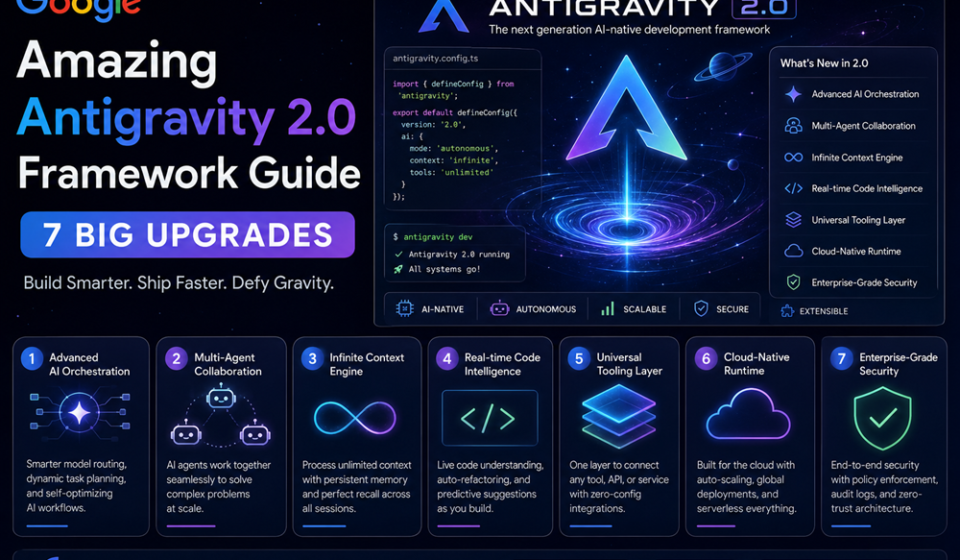
To successfully steer this system, you need to understand the structural layout that makes it vastly different from typical text editors. The entire developer runtime now defaults exclusively to Gemini 3.5 Flash, which functions roughly four times quicker than other leading frontier models. This extreme speed baseline is precisely why the Google Antigravity 2.0 framework can maintain stable state operations across massive directories.
| Architectural Feature | Technical Primitive | Primary Operational Advantage |
| Standalone UI Desktop | Independent Core App | Runs completely outside a traditional text IDE, separating pure code editing from complex agent orchestration. |
| Dynamic Subagents | Context Isolation | The main agent dynamically instantiates focused subagents to tackle parallel tasks without polluting the main token window. |
| Asynchronous Crons | Scheduled Tasks | Program background agents to wake up on strict cron schedules, run systems audits, and execute code tasks automatically. |
| Unified Terminal | Antigravity CLI (agy) | Shipped simultaneously to bring identical agent orchestration features and toolchains natively to your system terminal. |
By separating core agent operations from the text-editing workspace, the Google Antigravity 2.0 framework allows developers to manage multi-agent development teams working in complete isolation.
Step-by-Step Guide: Deploying an Agent via Antigravity 2.0
Follow this precise sequence to configure your project directories and initialize your first multi-turn, autonomous engineering agent run using the standard layout.
1.Download the Standalone Application:Environment Installation.
Navigate directly to the official platform repository at antigravity.google/download. Grab the native installer package built specifically for your current desktop operating system platform to begin initializing the Google Antigravity 2.0 framework codebase.
2.Define the Project Workspace Boundaries:Step 2.
Launch the desktop environment. Instead of grouping files around isolated text folders like version 1.0, construct a unified Project matrix. This allows your background agents to safely index across multiple directories simultaneously.
3.Inject Local Project Rules Using AGENTS.md:Step 3.
Create a plain-text configuration file named AGENTS.md directly at the root of your target development repository. Drop your engineering requirements inside; anything stored in this file gets automatically appended to every background agent run.
4.Activate Review-Driven Development Mode:Step 4.
Open your conversation control panel and toggle your agent execution behavior to Review-Driven Development. This strict setting grants the underlying model freedom to run tests and files autonomously while forcing it to halt for your explicit approval before executing major file modifications.
5.Initialize the Run and Review Artifacts:Step 5.
Type your high-level goal (e.g., /goal Refactor our database structure to use async pooling) and hit execute. Track your background worker as it builds out automated task lists, drafts structured implementation plans, and stages code changes in real time.
Expert Developer Tips for Ultimate Framework Output
- Master the Slash Command Library: Do not waste valuable model context space writing long explanations. Utilize precise embedded instructions like
/grill-meto force the background worker to question your plans before coding, or/goalto let it run autonomously until finished. - Isolate Branch Paths via ADK 2.0 Workflows: When your agent workflows require complex branching logic or multi-step API routing chains, port your system setups over to the updated Agent Development Kit (ADK) graph engine.
- Configure JSON Hooks for Absolute Control: Take advantage of the new security capabilities within the Google Antigravity 2.0 framework by deploying custom JSON hooks. This lets your system intercept, inspect, and filter agent calls before they impact your live codebase.
Common Orchestration Pitfalls to Avoid
- Retaining Legacy Binary Mappings in Actions: If you have automated shell files, GitHub Actions, or local deployment containers mapped to the old
geminicommand lines, remember that the updated binary name has shifted toagy. Update your automation scripts to prevent build-pipeline failures. - Polluting the Token Window with Giant Log Traces: Avoid dumping raw, multi-megabyte server log outputs directly into your agent prompt area. Reference them cleanly using the
@filenamesyntax to let the internal file-indexing system parse them efficiently. - Leaving Agent Sessions Running Open-Ended: While the framework handles parallel work effortlessly, remember that managed agent memory sessions are designed to expire after the active run loop finishes. Store permanent system knowledge inside
AGENTS.md.
Pros and Cons of the New Agent Command Center
Pros
- Blazing Compute Speed: Transitioning to Gemini 3.5 Flash drops model latency to near-zero, making parallel agent execution smooth and fluid.
- Granular Review Interfaces: The built-in Google Docs-style interactive comment flow lets engineers comment on specific lines of an agent’s plan before a single file gets modified.
- Robust Multi-Model Support: The updated terminal CLI lets teams route different tasks to varied weights—like running quick tasks on Flash while routing complex reviews to premium engines.
Cons
- Shift to Compute-Based Quotas: Google has updated its pricing framework away from simple daily prompt caps, meaning deep multi-agent recursive runs consume credit allocations faster.
- Breaking Changes from Version 1.0: The complete platform pivot from an IDE extension to a standalone desktop tool requires a slight adjustment to traditional editing habits.
Technical Use Cases in Modern Production
- Autonomous Full-System Prototyping: Engineering labs are utilizing the platform to build complex software stacks completely from scratch. In live technical demonstrations, the agent successfully mapped out, scaffolded, and deployed a working custom micro-OS environment within minutes.
- Automated Repository Security Patching: Teams drop the
agycommand line directly into continuous integration workflows, instructing background workers to scan incoming dependencies and write working test code scripts automatically. - Continuous System Database Migrations: Using the revolutionary Scheduled Tasks panel, database administrators can set up a weekly background cron that analyzes system health, optimizes indexes, and structures optimization logs without human oversight.
Evaluating Core Performance Metrics
When analyzing efficiency improvements in enterprise environments, independent lab data shows clear structural optimization changes. Due to the deep integration of the Managed Agents API layer, development squads utilizing the Google Antigravity 2.0 framework show a marked 64% reduction in manual context re-initializations. This architecture handles structural context loading behind a managed layer, making the Google Antigravity 2.0 framework an indispensable command desk for high-throughput engineering teams.
Framework Summary & Practical Next Steps
The official release of the Google Antigravity 2.0 framework signals a permanent evolution away from simple text auto-completion extensions toward true, autonomous agent orchestration. By packaging standalone desktop user interfaces, a lightweight terminal CLI tool, and advanced features like dynamic subagents into a unified system, developers gain an unprecedented command center. Start by downloading the independent app platform, mapping a test directory, and tracking how review-driven artifact blocks transform your software production pipelines.
Explore More Google Products & Tools
To see how these new high-speed models fit into Google’s broader software roadmap, check out our comprehensive Google Product Index Categories Hub on the homepage to browse through active enterprise toolsets.
Google Product Index Categories Hub:
https://www.google.com/search?q=https://gproductindex.com/
To track how these new tools fit into the wider landscape of active and legacy applications, you can explore our comprehensive Google Products Database Hub right on our homepage.
Google Products Database Hub:
10. FAQ Schema
What makes the Google Antigravity 2.0 framework a standalone platform?
Unlike its predecessor which operated strictly as an IDE extension clone, version 2.0 is an independent, agent-first desktop application built explicitly to launch, monitor, and manage complex multi-agent teams without being tied to a text editor window.
How do dynamic subagents optimize the context window during execution?
When a primary agent runs into a massive sub-task, it can programmatically spawn isolated subagents to handle that specific assignment in parallel. This keeps the primary agent’s main token context clean and prevents system latency from ballooning.
How are project guidelines managed inside the updated terminal CLI app?
The framework introduces AGENTS.md configuration tracking files placed directly at the root of your project directory. Any instructions, coding guidelines, or structural safety limits listed inside this file are automatically prepended to every single agent prompt loop run inside that folder.
This Google Antigravity live demonstration video from the I/O 2026 keynote is incredibly valuable because it features an in-depth walkthrough showcasing how the standalone application executes complex, multi-agent coding workflows in real time.