
The method we use to sift through our personal correspondence has officially fundamentally changed. Announced at Google I/O 2026, the global launch of the Gmail Live conversational voice framework transforms your mobile inbox from a flat wall of text entries into a fully interactive digital partner. Instead of sitting down to type complicated keyword combinations, you can now parse details across thousands of threads by simply talking out loud.
The platform relies directly on the speed of Gemini to process complex speech patterns on the fly. It securely crawls your personal mail archive to track gate updates, extract complex financial receipts, or summarize family discussions in fractions of a second.
Whether you are managing massive corporate logistics on an Android device or running quick on-the-go checks from an iOS device, activating the Gmail Live conversational voice interface will completely streamline your morning triage routine.
The Problem: The High Frustration of Manual Email Keywording
Traditional email searching is an exhausting, keyword-dependent puzzle. If you need to find an un-indexed rental door code, a hidden travel voucher, or a past contract amendment buried under months of data clutter, you are stuck guessing at exact phrases. If your spelling is slightly off, or if you mistake a corporate “field trip” label for a standard vacation “trip,” legacy search filters break down entirely, leaving you to scroll manually through endless old folders.
Deploying the native Gmail Live conversational voice feature directly eliminates this baseline data friction. Rather than forcing you to conform to rigid text rules, the AI engine easily adapts to your natural speech patterns. You can speak freely, stop the assistant mid-sentence to offer clarifications, or shift the topic completely without breaking the conversation model.
Deep Dive: The Core Ecosystem Tiers of the Voice Overhaul
To successfully configure this update, you must review the underlying access parameters and plan requirements. Google has structured its premium agent tools into a tier-based deployment matrix:
| AI Subscription Tier | Monthly Service Cost | Live Voice Search Status | Additional AI Inbox Perks |
| Google AI Plus | ₹399 / $7.99 | Coming Soon (Later Waves) | Instant task summaries, contextual ready-to-send draft responses. |
| Google AI Pro | ₹1,950 / $19.99 | Priority Access (Late Summer) | Shared 5 TB storage space, native Workspace shortcut maps. |
| Google AI Ultra | ₹6,500 / $100.00 | Immediate Access (US Beta Launch) | Full 24/7 background persistence, continuous memory keys. |
By utilizing the multi-turn memory properties of the Gmail Live conversational voice framework, high-tier subscribers gain a powerful assistant capable of parsing deep content layers across long text documents instantly.
Step-by-Step Guide: How to Enable Gmail Live Voice Controls
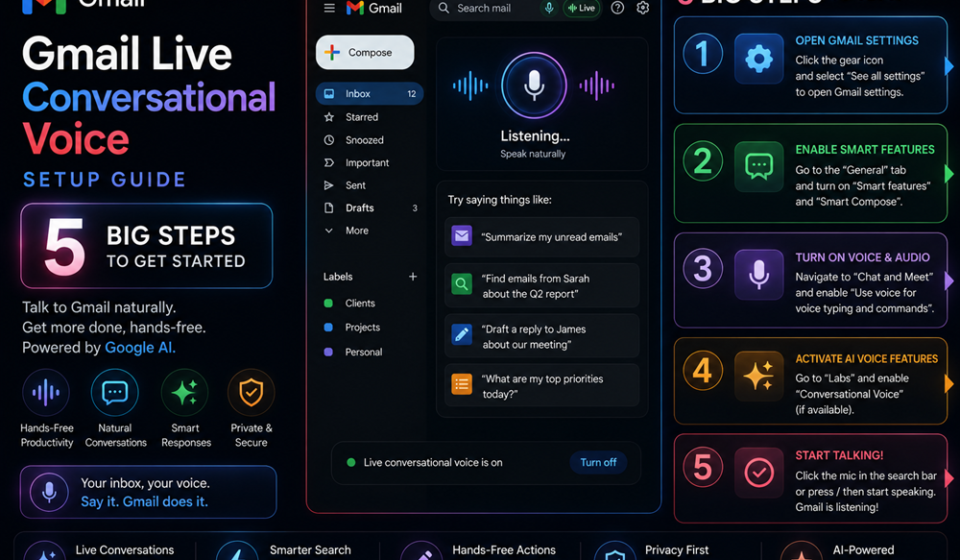
Ready to stop typing and start talking to your email workspace? Follow this precise setup sequence to activate your app settings and initiate your first hands-free inbox search run.
1.Confirm Workspace Plan Eligibility Core Tiers:Account Prep.
Log into your mobile account panel and ensure your profile links to a premium subscription plan, such as Google AI Pro or Ultra. Verify that your system language profile is configured to English (US) for early regional access.
2.Update the Mobile App to the 2026 Workspace Build:Step 2.
Launch the official iOS App Store or Google Play Store platform. Search for the app and click update to download the necessary files containing the latest Gmail Live conversational voice code modules.
3.Authorize Global Micro and Security Permissions:Step 3.
Open your device’s primary system settings panel. Navigate to the applications manager drawer, tap on the email client option, and ensure that your physical hardware Microphone permissions are toggled completely to Allowed.
4.Locate and Launch the Interactive Waveform Utility:Step 4.
Open your updated mobile inbox app. Look directly into the traditional top search bar area to locate the brand-new, pulsing Waveform Icon situated cleanly right beside the classic filter chips. Tap it to launch the full-screen layout.
5.Run Multi-Turn Queries and Manage Context Changes:Step 5.
Begin speaking naturally to your device. Try a multi-part command like: “What is my gate number for my flight tomorrow afternoon? Also, pull up the check-in document details from the hotel confirmation email.”
Expert Productivity Tricks for High-Speed Triage
- Interrupt the Assistant for Rapid Redirection: Do not waste valuable seconds waiting for the voice tool to read out a long paragraph. If you hear the specific piece of data you need, interrupt the assistant instantly by speaking your next follow-up query.
- Combine Voice Actions with the AI Inbox Workspace: Use your verbal sessions to drive backend organisation. Command the engine to “Mark all shipping update emails received this week as read, and flag the contract amendment from yesterday for my immediate review.”
- Leverage Dropdown Sourcing for Data Trust: To protect against unexpected data errors or hallucinations, look at your screen response. The Gmail Live conversational voice interface displays a transparent dropdown link underneath every answer, letting you jump directly to the verified source email.
Common Activation Pitfalls to Avoid
- Searching inside the Traditional Settings Cog Wheel: Looking for a specific activation toggle deep inside your standard profile account menus will slow you down. The tool launches natively through the waveform badge located directly inside the primary search bar wrapper.
- Forgetting to Clear Background Microphone Blockers: Running third-party recording tools or active communication voice apps simultaneously can block your microphone stream, preventing the Gmail Live conversational voice runtime from capturing clear vocal tokens.
- Using Highly Restricted Enterprise Domains without Admin Clears: If your business profile won’t surface the waveform utility, contact your platform administrator. Workspace managers must explicitly approve the Gemini Alpha testing track before corporate seats can run live voice tools.
Pros and Cons of Voice-First Inbox Navigation
Pros
- Unmatched Hands-Free Efficiency: Drastically slashes data retrieval timelines, allowing you to extract buried details while walking or multitasking.
- Superior Context Processing Velocity: Powered by Gemini, the framework parses months of message histories in seconds.
- Non-Invasive Optional Design: Sits cleanly alongside traditional keyword bars as an elective alternative rather than a forced, disruptive system layout swap.
Cons
- Early Geographic Rollout Limits: Initial summer rollout cycles remain strictly limited to US English user profiles.
- Premium Subscription Barrier: Accessing the active voice processing core requires a paid premium plan tier subscription.
Strategic Real-World Use Cases
- On-The-Go Field Operation Planning: Construction leads and traveling service operators verbally query their devices to extract changing client addresses, permit details, and gate schedules hands-free from the driver’s seat.
- Instant Accounting Expense Tracking: Small business owners review raw monthly receipts by commanding the interface to compile recent vendor balances, surface hidden billing alterations, and draft rapid confirmation responses.
- Asynchronous Project Management Catch-Up: Development managers use the tool to synthesize late-night engineering logs across separate teams, instantly filtering out automated noise to surface immediate project blockers.
Setup Summary & Immediate Next Steps
Learning how to properly activate the Gmail Live conversational voice interface marks an incredible, highly practical shift toward true ambient productivity. By moving beyond text search bars and utilizing a fluid, multi-turn verbal command center, you turn a cluttered message base into an easily searchable data asset. Start your transformation today by verifying your subscription tier eligibility, unlocking your app permissions, and testing multi-part spoken prompts to take complete control of your data flow.
Explore More Google Products & Tools
To see how these new high-speed models fit into Google’s broader software roadmap, check out our comprehensive Google Product Index Categories Hub on the homepage to browse through active enterprise toolsets.
Google Product Index Categories Hub:
https://www.google.com/search?q=https://gproductindex.com/
To track how these new tools fit into the wider landscape of active and legacy applications, you can explore our comprehensive Google Products Database Hub right on our homepage.
Google Products Database Hub:
10. FAQ Schema
Where is the waveform activation badge located inside the mobile layout?
The dedicated launch button is built directly into the main search bar panel right at the top of your mobile inbox screen. Look for the pulsing soundwave symbol placed right next to the standard keyword entry area.
Can I run a conversational voice session while my device screen is locked?
Yes. To ensure your conversational loops continue executing in the background, open your app settings drawer and toggle the Continue in background safety parameter to Enabled while turning on your primary system alert notifications.
How does the system protect sensitive data from training model tracks?
Google maintains strict corporate security boundaries over your personal records. All processes running inside the Gmail Live conversational voice framework execute through isolated secure APIs, ensuring that your financial or private email data is never exposed to broad public model training loops.
Would you like me to pull up specific code configurations for handling multi-turn webhook endpoints, or perhaps we can look into setting hard expense limitations under the Agent Payments Protocol?