
The way we interact with online streaming video has officially evolved. Released globally as a premier update, the widespread rollout of the Ask YouTube AI feature marks a massive shift in consumer media navigation. Instead of passively scrolling through video timelines, skipping through sponsor segments manually, or digging through messy comment sections, this tool integrates a conversational assistant directly underneath the playback window.
The system uses a highly optimized variant of Gemini 3.5 Flash to parse transcript metrics, visual data, and audio frequencies on the fly. It builds an instant, interactive index of the asset, ready to answer complex contextual questions the moment you hit play.
Whether you are studying long-form software engineering lectures or tracking complex tech reviews, mastering the Ask YouTube AI feature will completely transform your digital research habits.
The Problem: The Inefficiency of Blind Video Scrubbing
Traditional video search mechanics are completely broken. For over a decade, navigating an online clip meant clicking blindly along a tiny progress bar, relying on small thumbnail previews or rough creator-submitted chapters to find a specific moment. If you wanted to find one exact quote or a single code snippet inside an intense two-hour technical presentation, you were stuck wasting valuable time scrubbing back and forth.
The native deployment of the Ask YouTube AI feature completely solves this structural bottleneck. By treating video files as interactive data sheets rather than flat, linear playback streams, the system lets you extract answers instantly. You simply type a question, and the interface serves up concise text summaries alongside precise, clickable timestamp links to skip you straight to the exact second you need.
Deep Dive: The Core Systems of Conversational Video Search
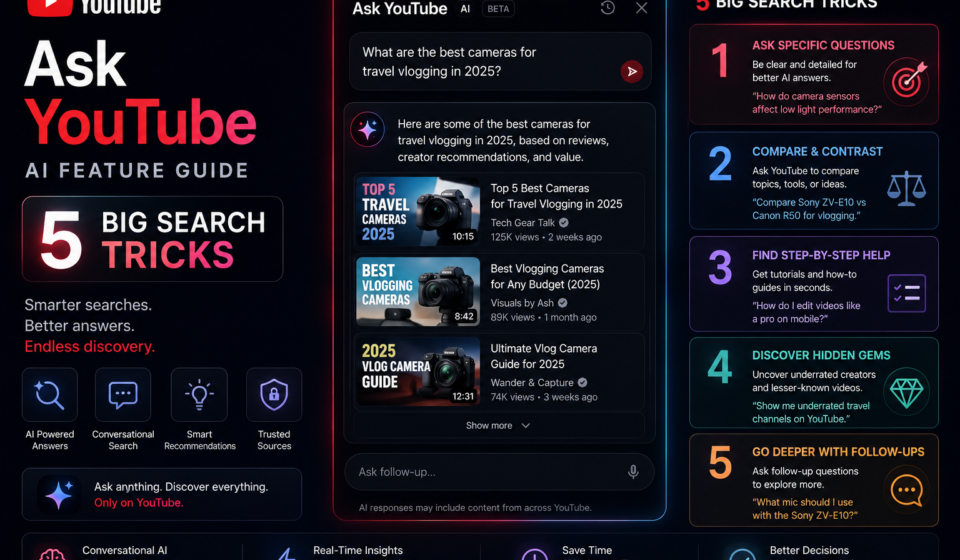
To successfully navigate this new interface layer, you need to understand the visual toolsets embedded inside your streaming layout. The application integrates three core pillars directly into the watch console:
| Interface Control Node | System Component | Primary Action & Behavior |
| “Ask” Action Button | AI Spark Toggle | Located directly beneath the video title, launching the conversational assistant sidebar with a single tap. |
| Pre-Baked Prompt Cards | One-Touch Filters | Instant macro chips that let you select common actions like “Summarize Video” or “Recommend Related Content.” |
| Conversational Chat Input | Custom Search Pill | An open-ended text bar built to handle complex, multi-turn follow-up questions about the active clip. |
By separating these tracking layers from the standard description box, the Ask YouTube AI feature provides a highly scannable, interactive workspace environment right on your mobile screen.
Step-by-Step Guide: Initializing Conversational Video Search
Ready to audit your first technical video or lecture series? Follow this precise setup sequence to trigger the assistant panel and configure your conversation pipeline.
1.Confirm Account Provisioning and Workspace Access:Environment Verification.
Log into your active profile and verify your eligibility criteria. Ensure you are running the most up-to-date application version on your mobile device, or accessing the platform via a modern desktop browser container.
2.Launch a Targeted Long-Form Media File:Step 2.
Navigate to your target material. Select a rich, detail-packed streaming asset—such as a multi-hour hardware review blueprint or a deep administrative server tutorial session.
3.Trigger the Dedicated Ask YouTube AI Sidebar Panel:Step 3.
Tap the prominent Ask button located next to the traditional share controls. Watch the main video window adjust automatically, sliding over to open up a clean, dedicated conversational drawer on the right side of your layout.
4.Execute a Primary Summarization Action Check:Step 4.
Select the pre-baked Summarize Video card to test connection integrity. Review the bulleted summary data layout that populates inside the panel, noting how key concepts are mapped directly to interactive timestamps.
5.Run Multi-Turn Follow-Up Queries Safely:Step 5.
Go beyond basic summaries by entering custom questions into the chat input pill. Type explicit instructions like: “Isolate the exact segment where the presenter configures the local network hooks and jump my video directly to that step.”
Expert Search Tricks for Maximizing Context Extraction
- Force the Interface into High-Density Bullet Layouts: Do not let the assistant respond with flat paragraph blocks. End your custom search queries with strict style rules such as: “Deliver this answer using short, highly scannable bullet configurations accented by bold keyword highlights.”
- Isolate Conflicting Statements Across Speakers: If you are tracking a multi-person debate series or a panel discussion, use conversational queries to audit inputs: “Analyze the discussion timeline, contrast what the second speaker says about deployment costs with the data shared by the founder, and flag any numerical discrepancies.”
- Cross-Reference Video Material with Broad Web Searches: Take advantage of the model’s cloud integrations by prompting: “Check the software version numbers mentioned in this 2025 tutorial clip, run a quick web search to see if the syntax has changed in 2026, and point out any required adjustments.”
Common Interface Pitfalls to Avoid
- Searching the Legacy Description Box for the AI Controls: Looking through the traditional description dropdown or scanning the comments column for the assistant will break your flow. The Ask YouTube AI feature uses its own distinct button right alongside the standard action row.
- Flooding the Input Pill with Vague Two-Word Phrases: Passing ultra-short inputs like “explain code” limits response depth. Be highly specific with your intent, such as: “Explain the architectural logic of the database configuration script shown on screen between minutes 12 and 15.”
- Expecting Deep Summaries from Music Videos or Raw Audio Tracks: Running intense context queries on files that lack spoken tracks or clear metadata can cause response quality to drop. Limit your conversational searches to information-rich, dialogue-heavy content for best results.
Pros and Cons of Google’s Conversational Search Assistant
Pros
- Stunning Time Efficiency Gains: Saves hours of manual scrubbing by turning dense multi-hour videos into instantly searchable text databases.
- Flawless Multi-Turn Continuity: Retains the core context of your previous questions perfectly, allowing for deep, organic follow-up discussions.
- Natively Synced Clickable Timestamps: Seamlessly bridges text answers with real-time video playback, jumping you to the exact frame you need instantly.
Cons
- Initial Access Restrictions: Advanced conversational features remain restricted during early launch waves to high-tier premium accounts.
- Short-Form Content Gaps: The interactive sidebar is explicitly optimized for long-form clips, offering limited utility when browsing short, 15-second vertical media formats.
Real-World Productivity Use Cases
- Rapid Technical Repository Code Auditing: Web developers pull up extensive framework deployment videos, utilizing the input box to pinpoint exact syntax changes, error resolution flags, and installation variables without watching the full stream.
- Streamlined Academic Lecture Synthesis: University students interact with complex medical or economic research clips, using the conversational engine to isolate key case studies and generate clear study sheets instantly.
- Fast-Paced Consumer Hardware Appraisals: Buyers triage massive multi-device comparison streams, commanding the tool to extract battery benchmarks, storage variables, and pricing matrices into a clean layout block.
Conversational Search Summary & Next Steps
Learning to leverage the Ask YouTube AI feature marks a permanent evolution in how we consume and study digital video media. By transforming linear video streams into dynamic, fully searchable text repositories, you gain an invaluable edge in research efficiency. Start exploring this update today by opening an information-dense tutorial, triggering the conversational workspace panel, and testing custom timestamp lookups to build a highly streamlined learning routine.
Explore More Google Products & Tools
To see how these new high-speed models fit into Google’s broader software roadmap, check out our comprehensive Google Product Index Categories Hub on the homepage to browse through active enterprise toolsets.
Google Product Index Categories Hub:
https://www.google.com/search?q=https://gproductindex.com/
To track how these new tools fit into the wider landscape of active and legacy applications, you can explore our comprehensive Google Products Database Hub right on our homepage.
Google Products Database Hub:
10. FAQ Schema
Where is the Ask YouTube AI feature button located inside the app interface?
You can find the active tool toggle directly within the standard action button row positioned right below the video title card. Look for the dedicated option labeled Ask next to the traditional download and share utilities.
Does conversational video search work on all types of uploads?
The feature delivers its highest accuracy when parsing information-dense, dialogue-heavy content like technical walk-throughs, product evaluations, and academic lectures. It offers limited utility on pure music videos or clips that lack clear spoken tracks.
Are my conversational search histories stored inside my personal account?
Yes. Your multi-turn video conversation records are securely managed through your cloud privacy dashboard. You can review past queries, clear localized search strings, or pause agent tracking keys at any time via your account settings.