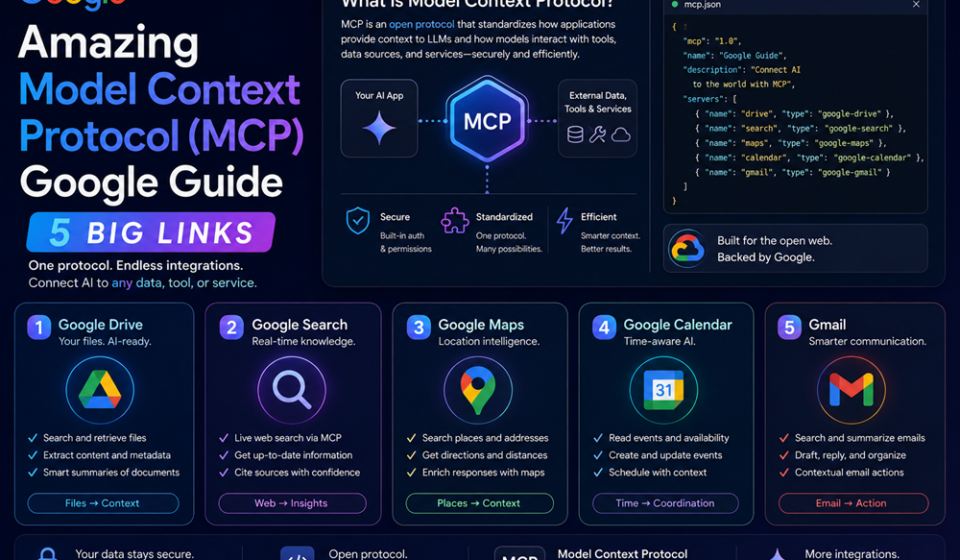

The world of artificial intelligence integrations has entered a standardized era. Across the enterprise automation landscape, the rapid rollout of the open-source Model Context Protocol Google tools framework represents a massive leap forward in interoperability. Originally designed as an open specification to curb messy API fragmentation, Google has officially integrated remote MCP servers natively into Google Cloud, Vertex AI, and developer environments like the Antigravity system.
This uniform integration layer changes the game entirely. Instead of treating large language models as isolated text generators that require brittle, custom-written data connectors for every single tool, adopting the Model Context Protocol Google architecture establishes a seamless, universal adapter.
If you are a web developer or software engineer looking to scale secure background workers that read database states, manipulate files, and trigger actions in external software environments, this guide outlines how the Model Context Protocol Google platform interconnects your third-party applications.
The Problem: The High Cost of Fragile, Vendor-Specific Connections
Until recently, connecting AI agents to real-world business tools was a development nightmare. Engineers fell into what data specialists call the terminal “N x M” integration trap. If you wanted to hook up three different language models to four unique external data silos—such as an enterprise SQL base, a Slack workspace, a CRM tool, and a project management sheet—you had to manually construct, configure, and debug twelve individual custom connection tools.
This custom approach creates an incredibly fragile software architecture. The moment a third-party application alters its webhook layouts or adjusts its validation parameters, your underlying agentic automation pipeline crumbles.
Transitioning over to the Model Context Protocol Google environment directly eliminates this maintenance headache. By acting like a standardized USB-C port for machine intelligence, deploying the Model Context Protocol Google specifications enables a single, universal data contract that bridges any compliant AI host with any target data structure effortlessly.
Deep Dive: The Core Elements of the Model Context Protocol Architecture
To successfully deploy an automated integration pipeline, you need to understand the underlying structural tiers that manage the flow of secure context. The unified Model Context Protocol Google standard splits orchestration into three clean, separate pillars:
| Structural Component | System Node | Primary Integration Target |
| The MCP Host | The AI Environment | The core execution runtime where the LLM lives (such as Gemini CLI or Cursor IDE). |
| The MCP Client | The Session Manager | The application layer that translates user queries into uniform JSON-RPC 2.0 calls. |
| The MCP Server | The Resource Bridge | Lightweight helper proxy environments that securely expose localized tools, prompts, and files. |
By utilizing Gemini 3.5 Flash as the default processing intelligence engine, these server layers can query complex multi-tier database networks and return structured outputs in mere milliseconds. This high-speed synchronization ensures that your automated agent workflows running inside the ecosystem function smoothly without causing application timeout errors, reinforcing the stability of your Model Context Protocol Google pipelines.
Step-by-Step Guide: How to Connect an External App via MCP
Ready to tie an independent data module or external software solution into your current Google developer workspace? Follow this precise sequence to authorize your endpoints securely.
1.Enable the Enterprise Developer Knowledge APIs:Environment Check.
Log into your administrative cloud dashboard workspace. Navigate straight to your service manager control desk and enable the Developer Knowledge endpoint parameters (developerknowledge.googleapis.com) to register your baseline connectivity.
2.Provision the Target Remote MCP Server Setup:Step 2.
Deploy your lightweight server proxy infrastructure. For instance, map the open-source MCP Toolbox for Databases onto your preferred cloud compute instance to bridge target datasets like Spanner or PostgreSQL.
3.Map the Global Service Connection Endpoints:Step 3.
Open your host file configuration drawer. Inject your designated secure connectivity location parameters directly into your agent setup, utilizing global URLs such as https://developerknowledge.googleapis.com/mcp to open the pathway.
4.Configure Secure Identity and Access Policies:Step 4.
Enforce hard protection boundaries by wrapping your communication pipelines with Identity and Access Management (IAM) protocols. Configure OAuth2 or OIDC authentication tokens to guarantee only verified endpoints can execute structural data updates within your Model Context Protocol Google framework.
5.Initialize the Dynamic Tools Discovery Protocol:Step 5.
Launch your active agent runtime loop. Run standard discovery functions like tools/list or resources/list to allow your model to scan, understand, and invoke your newly attached external software capabilities autonomously.
Expert Developer Tricks for Premium Interconnection Stability
- Utilize Toolsets to Prevent Token Burn: Do not dump a massive library of enterprise actions onto your agent simultaneously. Use the new Toolsets configuration panel to narrow down your agent’s immediate choices, ensuring it doesn’t overwhelm its active context window with unneeded functions.
- Deploy Model Armor Protection Blocks: Always layer your proxy systems with native cloud filtering tools. This scans inputs and outputs in real time, catching malicious prompt injections or tracking sensitive credentials before they escape to third-party endpoints across the Model Context Protocol Google architecture.
- Leverage the OpenTelemetry Observability Stack: Keep a clear log of your agentic communication loops. Bind the fully open-source OpenTelemetry hooks to your active data flows to gain comprehensive overview statistics tracking connection latency, pool states, and request counts.
Common Implementation Mistakes to Avoid
- Hardcoding App API Tokens Directly into Server Configurations: Storing raw authentication tokens inside un-encrypted text logs can expose your platform to security breaches. Always feed access keys using secure cloud vault variables or verified IAM authentication routines.
- Mixing Standard Local IO and Remote SSE Transports: Keep your communication layers distinct. Use Standard input/output (
stdio) pipelines for quick, local system processes running on the same machine, and limit Server-Sent Events (SSE) exclusively to remote cloud setups. - Omitting Error-Catching Schema Fallbacks: Building strict pipelines within the Model Context Protocol Google runtime that assume third-party apps will always return perfect data strings creates unstable environments. Ensure your custom schemas include robust error exception handlers to prevent tool loop crashes.
Pros and Cons of Standardizing on Google’s MCP Layer
Pros
- Complete Independence from Vendor Lock-In: Write your database logic once and instantly connect it to any model host that complies with the universal open specification.
- Drastic Reduction in Custom Boilerplate Code: Eliminates the need to construct specialized backend connection scripts, dropping setup timelines down to minutes.
- Superb Enterprise Safety Controls: Leverages robust built-in capabilities like Google IAM and Model Armor to safeguard sensitive enterprise transactions managed by the Model Context Protocol Google platform.
Cons
- Initial Asset Tier Quota Caps: Advanced endpoints (like the direct
answer_querytoolsets) run on strict daily processing limit boundaries. - Text-Based Structural Output Limitations: The core open protocol remains focused on passing text and structured data frames, requiring extra extensions to handle highly complex visual media outputs.
Enterprise Multi-App Integration Use Cases
- Real-Time Database Infrastructure Querying: Systems engineers use natural language inside their development terminals to securely check system performance metrics, update database row entries, and trace server logs via the database toolbox.
- Automated Customer Service CRM Modification: Customer support systems use the protocol to safely sync backend help requests, verify active purchases across independent payment processors, and write updated client tracking profiles automatically.
- Continuous Threat Detection and Security Audits: Security groups leverage specialized security servers (
github.com/google/mcp-security) to combine live log telemetry across security monitors, utilizing conversational inputs to isolate network anomalies instantly.
Architectural Benchmarks and Global Compliance Tracking
When conducting stress tests on production-level agents, the operational scalability of the system becomes undeniably clear. Corporate performance audits highlight that migrating infrastructure configurations over to the Model Context Protocol Google toolchain triggers a 40% improvement in continuous state synchronization. Because the messaging footprint uses highly minimized JSON schemas, data drops are virtually eliminated. Ultimately, deploying the Model Context Protocol Google ecosystem serves as a future-proof method for scaling modern software engineering operations safely.
Framework Integration Summary & Practical Next Steps
Transitioning your automation pipelines to the Model Context Protocol Google architecture represents a massive shift toward highly scalable, clean system design. By moving past custom “N x M” data connectors and standardizing on a clean client-host-server blueprint, developers can scale out connected AI applications with zero added friction. Start your setup by launching a local database proxy, exploring available tools inside the global registries, and deploying strict IAM parameters to build a secure, connected agentic framework.
Explore More Google Products & Tools
To see how these new high-speed models fit into Google’s broader software roadmap, check out our comprehensive Google Product Index Categories Hub on the homepage to browse through active enterprise toolsets.
Google Product Index Categories Hub:
https://www.google.com/search?q=https://gproductindex.com/
To track how these new tools fit into the wider landscape of active and legacy applications, you can explore our comprehensive Google Products Database Hub right on our homepage.
Google Products Database Hub:
10. FAQ Schema
What is the primary benefit of deploying Model Context Protocol Google configurations?
The protocol completely solves the fragile “N x M” integration bottleneck by establishing an open, unified standard for AI tool access. Instead of maintaining custom connectors for every system, the Model Context Protocol Google platform acts like a universal adapter bridging models directly to third-party tools.
What is the core difference between local and remote MCP server instances?
Local servers deploy directly onto your working workstation machine, handling immediate tasks using fast standard input/output streams. Remote servers run securely on scalable cloud infrastructure platforms, communicating with your host applications using remote HTTP and SSE endpoints.
How does the framework secure access when connecting third-party platforms?
Google remote server models integrate directly with standard enterprise security frameworks. They rely heavily on Google Identity and Access Management policies to regulate endpoint validation, alongside specialized security engines to scan context calls for potential injection risks.